Move a camera through a PlayStation game and the world rarely stays still. Walls appear to bend, character silhouettes twitch, and floor polygons sometimes cover the objects standing on them. Distant textures sparkle as if every surface is covered in glitter.
The label “PS1 wobble” covers several artifacts produced independently at different stages of the console’s graphics pipeline. Each results from information being reduced or omitted at a particular stage.
A 3D front end and a 2D renderer
The PlayStation splits graphics work between two main components. The Geometry Transformation Engine (GTE), a coprocessor attached to the CPU, handles matrix operations, lighting, and perspective projection. The GPU then draws polygons, lines, and rectangles into video memory.
This division determines what information reaches the GPU. The GTE works with 3D vertices, but the GPU receives polygons that have already been projected onto the screen. A polygon command contains whole-number X and Y positions, texture coordinates, colors, and some drawing state. It does not contain a Z coordinate for each vertex.
In simplified form, the pipeline looks like this:
3D vertices
    -> GTE transformation and projection
    -> software depth ordering
    -> 2D GPU commands
    -> framebuffer in VRAM
In practice, the GPU rasterizes already-projected 2D polygons. Once depth and fractional screen positions have been removed from a command, the rasterizer cannot recover them.
Whole pixels make geometry wobble
Imagine that a projected vertex moves horizontally from 120.2 pixels through 121.2 over several frames. On a rasterizer with subpixel vertex precision, that fractional movement is retained while the triangle is converted into pixels. On the PlayStation, the GPU receives only a whole-number screen position. The vertex remains at one coordinate, then snaps to the next.
The movement of a single vertex may be hard to notice, but a model contains many connected vertices whose rounding thresholds differ. As the camera moves, silhouettes jitter and small triangles appear to change shape. Low display resolutions make every one-pixel step proportionally larger and easier to see.
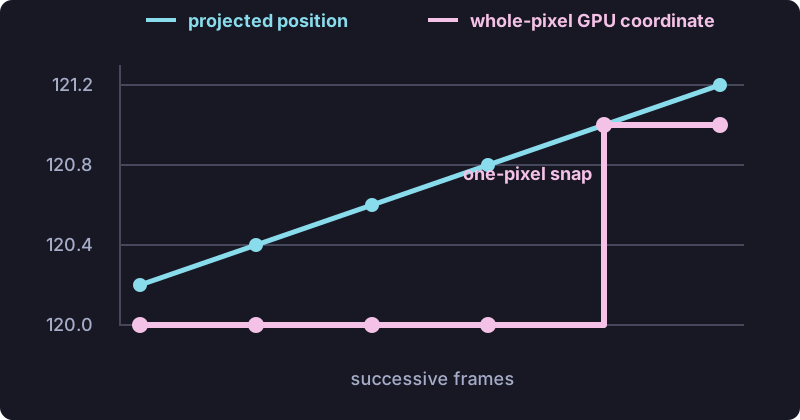
The lack of a floating-point unit is sometimes blamed for this effect, although the GTE’s fixed-point transformation matrices, screen offsets, and intermediate calculations all retain fractional precision. The visible discontinuity appears only when the projected coordinates are converted to the whole-pixel X/Y values accepted by the GPU.
Affine textures make surfaces swim
Texture warping comes from a different part of the pipeline. Vertex rounding can affect untextured geometry, while affine mapping can distort a textured polygon even when its vertices remain still.
Each vertex of a textured polygon has a pair of texture coordinates, usually called U and V. The rasterizer must determine the U/V value for every pixel inside the triangle. The PlayStation does this by linearly interpolating them across the already-projected 2D shape. This is affine texture mapping.
For screen-space weights a, b, and c, the affine calculation is approximately:
u = a*u0 + b*u1 + c*u2
Correct perspective mapping must account for each vertex’s depth. Conceptually, it interpolates u/z and 1/z, then reconstructs U at each pixel:
u = (a*u0/z0 + b*u1/z1 + c*u2/z2)
    / (a/z0 + b/z1 + c/z2)
The first calculation is much cheaper, but it assumes the texture lies flat in screen space. The error becomes obvious on a large polygon receding into the distance, such as a floor, road, or wall viewed at an angle. The resulting checkerboard bends across the two triangles rather than compressing uniformly toward the horizon.
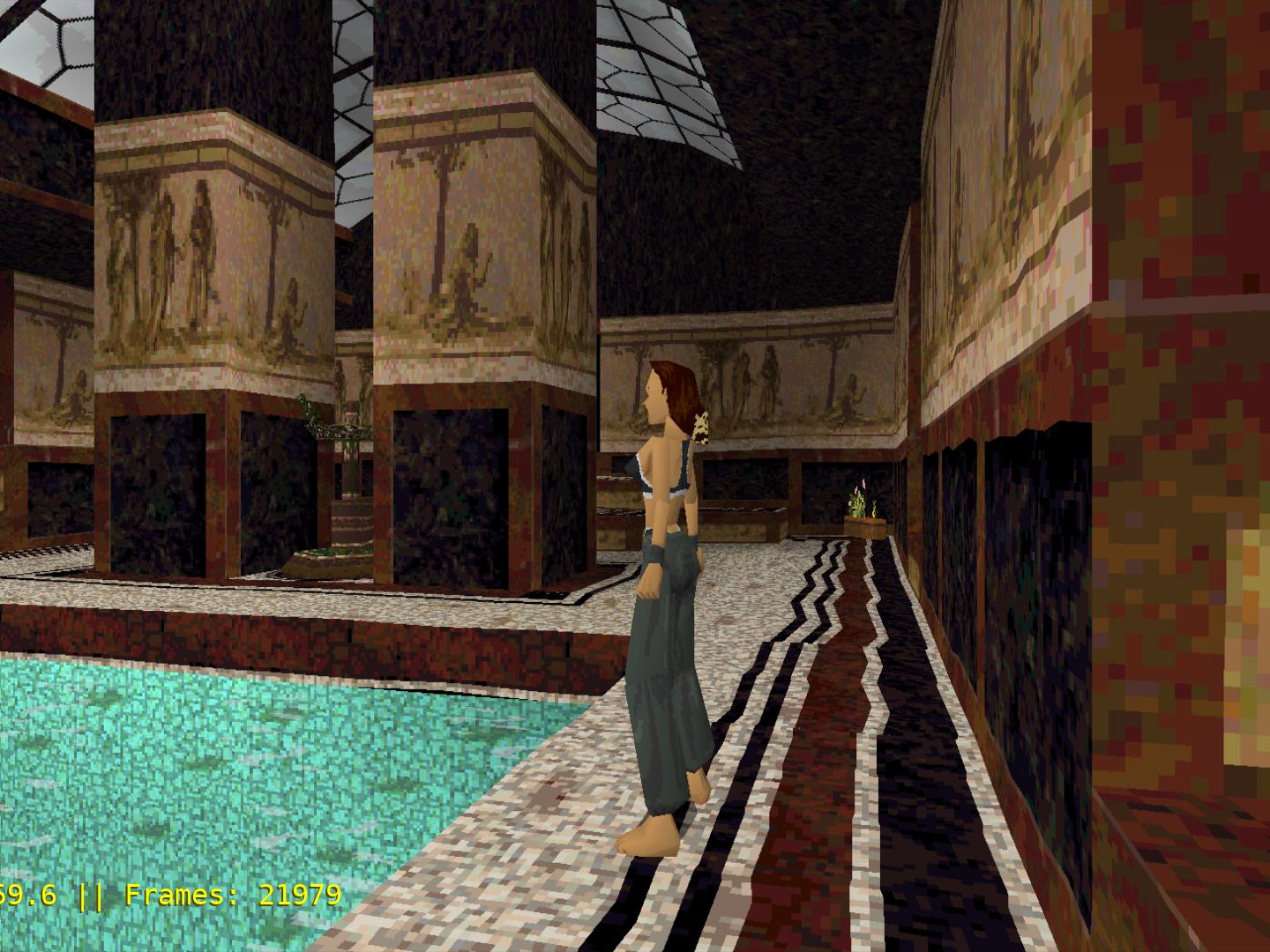 Affine mapping
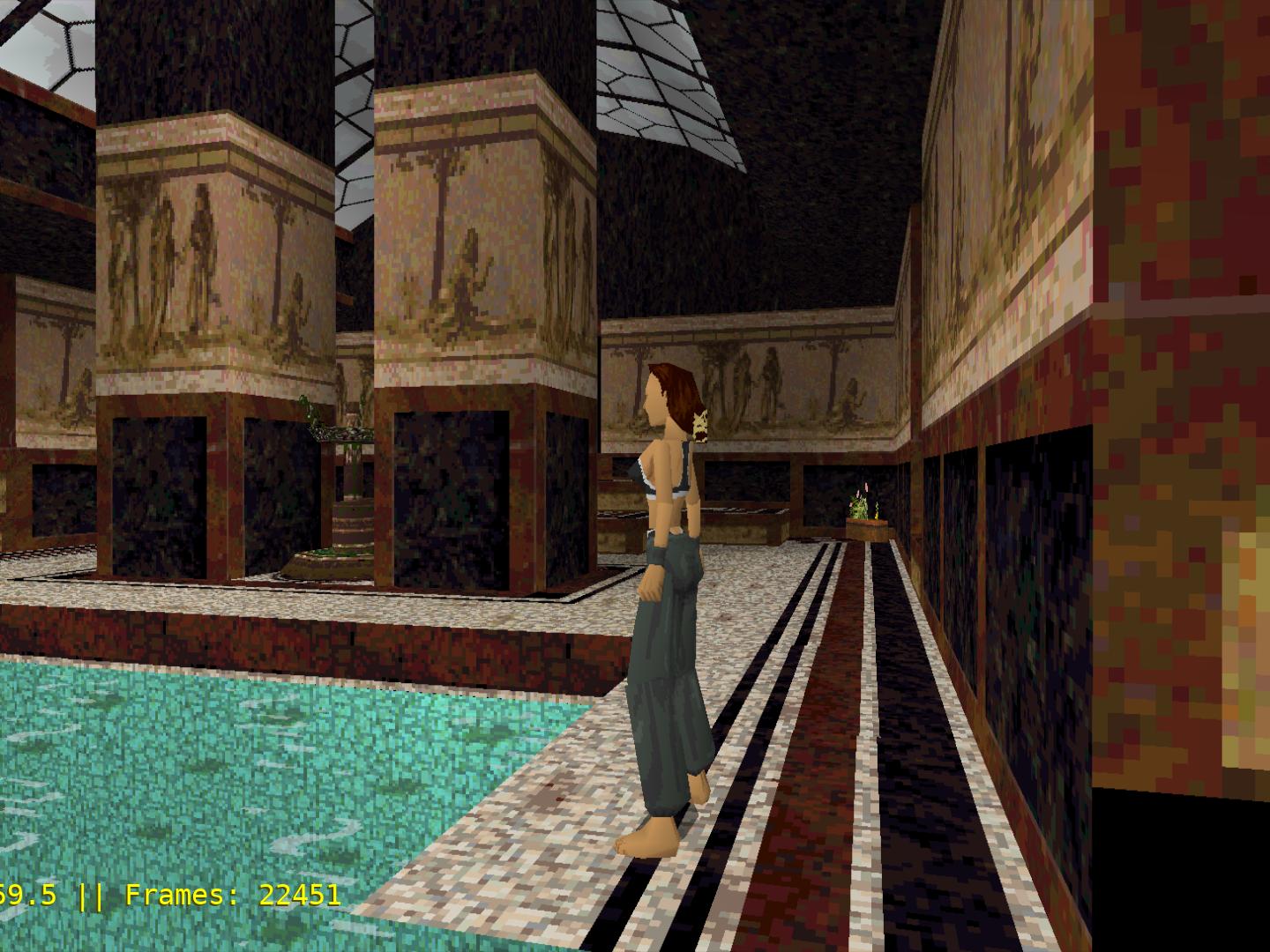 Perspective-correct
Movement makes the distortion more conspicuous. Every frame produces a slightly different projected triangle, then fits a new affine mapping onto it. Combined with vertices snapping between pixels, the texture seems to swim over the geometry.
The standard workaround was subdivision. Splitting one large polygon into many small ones gives each affine approximation a smaller depth range, bringing it closer to the perspective-correct result. Sony’s libraries included routines for this, and later games often tessellated important surfaces aggressively. Subdivision increased the number of vertices the game had to transform, sort, store, and draw.
Daniel Ilett’s affine texture mapping demonstration reproduces the same effect on a modern GPU by explicitly disabling its normal perspective correction.
No depth buffer makes polygons pop
A modern depth buffer stores a depth value for every screen pixel. Before drawing a new pixel, the GPU compares its depth with the value already stored and keeps whichever surface is closer.
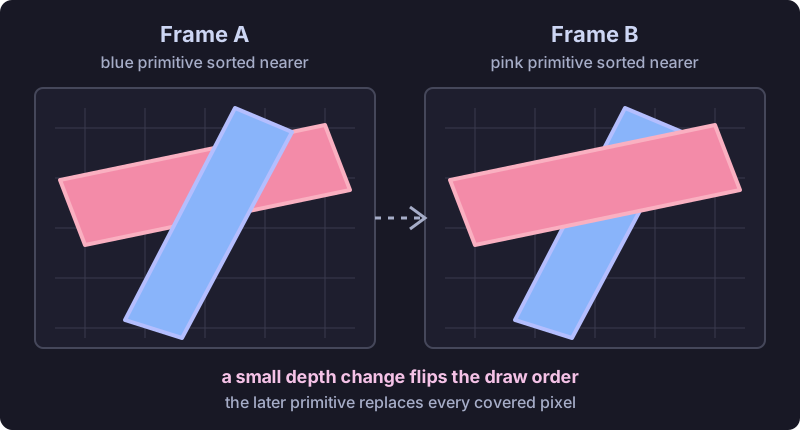
The PlayStation GPU has no such buffer. It paints commands in order, and a later polygon overwrites an earlier one. Games generally handled this with an ordering table in main memory: assign each primitive to a depth bucket, then send distant buckets to the GPU before nearby ones.
The GTE even has instructions for calculating the average depth of three or four vertices. But one average value cannot describe every part of a large polygon. Primitive-level sorting also cannot always resolve intersecting surfaces or three polygons that overlap cyclically. Two primitives in the same coarse bucket still need an arbitrary order.
When that approximation changes from one frame to the next, a whole polygon can suddenly jump in front of another. This is the source of characteristic surface popping and flickering intersections. The severity of these artifacts depends on each game’s sorting code and scene design.
Texture sampling and color output
Texture sampling and color precision account for several other recognizable artifacts.
The GPU samples textures without bilinear filtering. When a texture is enlarged, one source texel becomes a hard-edged block of screen pixels instead of blending with its neighbors. The GPU also has no native mipmapping. When a detailed texture becomes smaller than a pixel, tiny camera movements select different texels and produce shimmer.
These sampling limitations produce blockiness and shimmer rather than warping. Warping originates in the interpolation of texture coordinates across the polygon.
Normal drawing uses five bits for each red, green, and blue channel. Smooth gradients therefore have only 32 levels per channel and can form visible bands. The GPU can add a repeating 4x4 dither pattern before reducing colors to that format. At normal viewing distance, especially through an analog signal on a CRT, the pattern helps adjacent color levels blend perceptually. Enlarged on a modern display, the ordered noise becomes an artifact of its own.
Low framebuffer resolutions amplify these effects. The exact resolution varied by game and display mode according to memory and performance requirements.
How developers worked around the hardware
Memory capacity and bandwidth help explain these hardware choices. The PlayStation has 1 MB of VRAM shared by framebuffers, textures, and color lookup tables. At 320x240, a 16-bit depth buffer would consume another 150 KiB, before accounting for the bandwidth needed to read and update it for every pixel. Perspective correction and filtering would require more interpolation hardware, texture reads, and cache capacity.
Although Sony’s intent is not documented here, the hardware design favors a simple command stream and high practical drawing throughput, leaving difficult cases to software and game design.
Developers responded in different ways. They subdivided prominent surfaces, kept problematic geometry away from the camera, used fog to shorten sight lines, and built custom sorting and clipping systems. Naughty Dog went further with Crash Bandicoot: its rail camera made it possible to precompute visibility and polygon ordering, while shaded, mostly untextured character geometry avoided the worst texture stretching. Andy Gavin’s development retrospective describes how those constraints shaped the game’s visual design throughout development.
What emulators reveal
Modern emulators make it possible to isolate each source of instability. Subpixel precision reduces geometry wobble, perspective-correct texturing straightens warped surfaces, and enhanced depth handling improves polygon ordering. Enabling these features individually shows how much each stage contributes to the collection of effects called “PS1 wobble.”
On original hardware, whole-pixel vertex coordinates, affine texture mapping, approximate depth sorting, nearest-neighbor sampling, and limited color precision all operate at once. Together, these independent limitations produced the visual character now associated with PlayStation graphics.